Review: iTunes Match Finally Delivers What I’ve Been Wanting

I've been an iTunes user since day one (and even SoundJam before that). I've been an iPod user since day one too. I have a decent sized *music collection (6,649 songs) with a mix of tunes ripped from my CDs, purchased from the iTunes store and purchased/downloaded from other sources such as Amazon.com. While Apple has always done a good job in allowing me to sync my music/playlists to any number of iDevices, for some reason the company never saw fit to allow automatic syncing of music between multiple computers. I've complained about this on my blog in the past as well as going with 3rd party work arounds. 


The NEW iTunes Match Solves My Problems

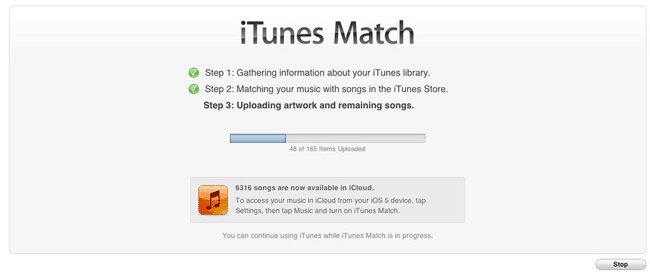
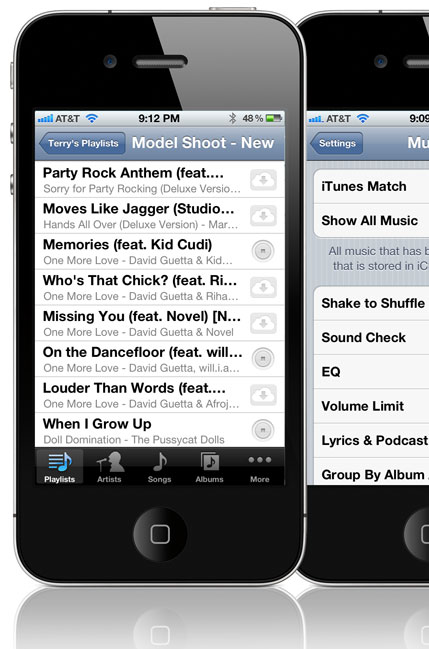
In addition to iOS 5, iCloud and iTunes 10.5, Apple rolled out a new service called iTunes Match. iTunes Match is a paid service ($24.99/Year) and the idea behind it is that once you sign up (via iTunes 5) your music collection will be analyzed and "matched" with the music currently available on the iTunes store, whether you originally bought the music from the store or not. Tracks that are matched are then available to up to 10 of your devices (Macs, PCs, iDevices running iOS 5, or Apple TVs) via the cloud.

This also includes your playlists! Tracks that were not matched (in other words songs you have that aren't on the iTunes store) are then UPLOADED from your library to the iTunes cloud (iCloud). This means that ALL of your music is now available in the cloud no matter where you obtained it originally. 


Problems this solves for me

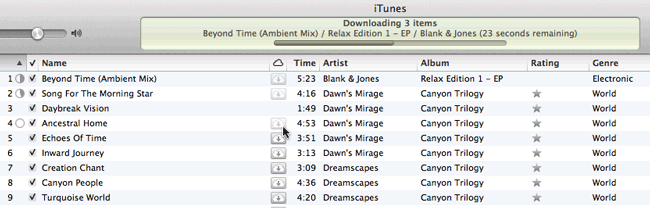
Once it did the initial "match" on my dedicated iTunes media server (a dedicated iMac running iTunes 24/7). I then went to my MacBook Pro and deleted all the music from that library. Once I deleted all the songs and playlists, I turned on iTunes Match on that computer as well. After a few moments ALL of my Playlists appeared on the MacBook Pro that are on the iMac. Any song/playlist that I want to listen to can now be streamed via the cloud. Also any music/playlists that I actually want to be physically on the drive say for offline listening can be downloaded with a single click. As long as my MacBook Pro has an internet connection I have access to ALL of my music at all times. Those times that I don't have access to the internet I can still enjoy the music that I've downloaded. 

On my iPhone, iPod touch and iPad – we know that these devices have limited storage. Therefore carrying around a large music collection means giving up something else. Once I turned on iTunes Match on these devices the music that was stored on them was immediately wiped and just like on my MacBook Pro, after a few moments I had access to ALL of my Playlists and All of my songs. The difference here is that any song you play is not only streamed initially but also stored so that it won't have to stream a second time. And yes you can proactively download any song(s) playlists that you know you'll want to be stored on the device for offline listening.


The Bottom Line

The benefits of iTunes Match are clear! I have access to ALL of my Music on any of my devices at all times (with an internet connection). I now use less space on my iDevices because I don't have them loaded up with music that "I may want to listen to someday". The other advantage is QUALITY! Some of my original CD Rips were at a lower bitrate. With iTunes Match you get everything at Unprotected AAC, 256Kbps (iTunes Plus) Quality. The other slick feature is that now it doesn't matter where I make organizational changes or new purchases. If I change a playlist on my MacBook Pro it's updated everywhere. If I buy a new song and add it to a playlist on my iPad, it's updated and available everywhere. This is one of those services that's worth every penny to me!

You couple iTunes Match with the new iTunes WiFi Sync for iOS (iPod touch in the car) and I'm completely in music heaven! I pull into my garage and it connects to the WiFi in my home and syncs the iPod with the latest changes. 

Now let's get iTunes Match for video/movies!

*Note: If you have more than 25,000 songs in your library that you did NOT get from the iTunes store then you exceed the limit of iTunes Match. iTunes Match only works for songs, not audiobooks, videos, ringtones, podcasts, etc.

It’s Cyber Monday 2011

If you are like me and stayed at home on Black Friday, you know that there are some great deals online without fighting the crowds in the stores. Cyber Monday is the official day for etailers to lure us in with their online deals. Here are a few noteworthy ones:


As the world's largest etailer, Amazon will not be outdone!


B&H Photo & Video – various deals

Gelaskins (where I get my custom skins for my MacBook Pros, iPad and iPhones) are doing 20% Off

HyperShop (Where I get my backup travel batteries from) is doing up to 75% off

iHome Audio – is doing 25% off 25 Select Items + Free shipping (on orders $60 or more) Use code ALSUP2525

Kelby Training – Their biggest sale of the year!

LCD4Video – Lots of cool photography and video gadgets on sale today!

MacMall – Up to 85% off!

Moo – (where i get my photo business cards) 30% off!

Nikon Cyber Monday Instant Savings

Scottevest (jackets with pockets for your gear – yes I wear one) is doing 30% 9 items


By the way, this is another reason why I don't go out shopping on Black Friday – sad….

httpv://www.youtube.com/watch?v=l8_QQPjjj1k

Terry’s Black Friday Deal Picks For 2011

Terry found a deal

If you live in the US, then chances are you've heard of Black Friday. It's the day after Thanksgiving that retailers hold special sales to lure you in to get your  holiday shopping dollars. Whether you're shopping for holiday gifts or just looking for deals on stuff, Black Friday and Now Cyber Monday (the Monday following Thanksgiving) are worth checking out. Sometimes the savings can be substantial and if it saves you a few bucks on something you were going to buy anyway, why not take it?

I'm not one to go out and stand in line to save a few bucks on something, however I will absolutely check out online deals for gear.

As you might imagine I get all kinds of emails advertising Black Friday deals. So I've decided to share some of the ones I've hand picked here based on technology, Adobe, iOS/Apple, Photography and the other things that I'm interested in. So here goes in no particular order:


Amazon.com has been running Black Friday deals all week on all kinds of gear:


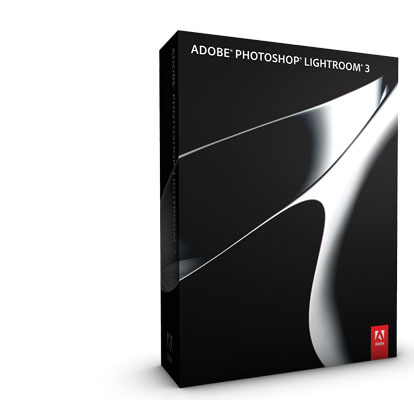
HOT! Lightroom 3 for only $99.99


B&H Photo and Video Holiday Deals 2011

Canon Double Instant Rebates Savings Up to $500 on DSLR & Lens Bundles Here


Save up to 50% on Adobe Software

Let Adobe help with your holiday shopping and save up to 50% here.


J&R.com

J&R Computer/Music World


Smarthome Black Friday Deals

Smarthome, Inc.


TigerDirect's Pink Friday Sale

TigerDirect Black Friday


LCD4Video Black Friday Deals


Other Deals

iPhone and iPad Apps on Sale Today!

Apple – 10% savings on select Apple gear.

3G Store – up to a $100 eGift Certificate

BlueSLR for Nikon – $45 off!

HyperShop – up to 75% off

Mophie (iPhone external batteries) – 30% off

NIK Software – save up to $200

Nikon, Inc. – Instant Savings

Other World Computing – lots of deals

SanDisk – up to 75% off


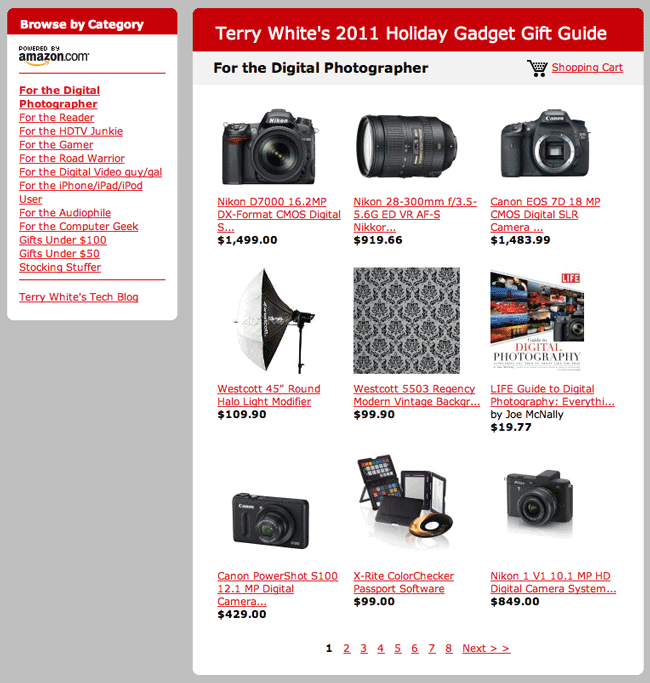
Of course don't forget to check out my 2011 Holiday Gadget Gift Guide

Happy Thanksgiving!

I want to take this opportunity to wish everyone a very Happy Thanksgiving!

One of the things that I'm most thankful for is the overwhelming amount of support that I receive from my readers and fans. Enjoy time with your friends and family.

If you get into the whole holiday shopping thing be sure to come back tomorrow to take a peek at some hand picked Black Friday Gadget/Tech Deals.

Otherwise, enjoy! I'm looking forward to the long weekend.

My 2011 Holiday Gadget Gift Guide is Here!


That's right it's my guide to help you with you holiday shopping for the gadget lover (freak) on your list. The way this thing started was each year towards the holiday season all my friends started asking me and emailing about what my picks were in various categories and of course the answers were usually the same. So I decided to compile a list and just email it to the folks that asked.

Once again I've put together a Holiday Gadget Gift Guide to help you pick out gifts for the techies and gadget lovers on your gift list. I've chosen Amazon.com simply because they are the one online retailer with not only the largest presence, but also the one that carries 99% of the items I recommend. Another advantage is that I can continue to add things that come up all the way up to the final days of the holiday season. In previous years I would always find some cool gadgets after the static gift guide was published. Now because they don't carry every single item on my recommendation list, you can check for some Extras at the bottom of this post.


How did you pick the items that you recommend?

Simple! If it's in my guide it's because I either use it now, have used it in the past or one of my close friends or colleagues use it and I trust their opinion. Now in some cases there may be an item in the guide that is NEWER than the one I use and I had to list that one because my model is no longer available. Unless I've used it or know someone who has, it doesn't get in PERIOD.


How does the gift guide work?

The guide is broken out by Category so that you can shop accordingly. This way you can pick your gift by the kind of person you're shopping for. I know that sometimes you have to buy a gift based on a certain dollar amount or budget (like gifts for co-workers), so I've given you a couple of dollar amount categories too. Happy shopping and in case I don't see you later, Happy Holidays to you and your family! You can go straight to my 2011 Holiday Gift Guide here.


Continue reading “My 2011 Holiday Gadget Gift Guide is Here!”

How to Publish Your Photos From Lightroom Directly to Google+

httpv://www.youtube.com/watch?v=W5viFc6MwA4


In this episode of the Adobe Creative Suite Podcast I'll show you How to Publish Your Photos from Lightroom Directly To Google+. Special thanks goes out to Tom Roper for leading me to this tip. 

Get the Lightroom Picasa Plug-in here.

Add me on Google+ Here.

See the resulting Google+ "Recent Work" gallery here.

Also don't forget that Lightroom 3 is currently ON SALE for HALF OFF here.

See more of my Adobe Creative Suite Videos on my Adobe Creative Suite Podcast and get the App here. It features EXCLUSIVE CONTENT that no one else gets to see. This episode has a BONUS CLIP that is available only in the App:

Learn Adobe Creative Suite with Terry White - Wizzard Media

PS. My iOS App just got an update that fixes the iOS 5 video playback problem and adds the following features:

  • Retina Display Graphics
  • A new tab bar interface
  • Swiping to the left and right from the episode detail page will go to the next or previous episode
  • UI enhancements
  • Faster show loading
  • Minor bug fixes


How to Use Lightroom 3’s Smart Collections in Publish Services

httpv://www.youtube.com/watch?v=41Oy6vV17Hs


In this episode of the Adobe Creative Suite Podcast I'll show you how to combine the use of Smart Collections and the Publish Services in Lightroom 3 to publish and maintain the same collection of photos on multiple social networking sites such as Flickr, Facebook and Smugmug.

See more of my Adobe Creative Suite Videos on my Adobe Creative Suite Podcast and get the App here. It features EXCLUSIVE CONTENT that no one else gets to see. This episode has a BONUS CLIP that is available only in the App:

Learn Adobe Creative Suite with Terry White - Wizzard Media

PS. My iOS App just got an update that fixes the iOS 5 video playback problem and adds the following features:

  • Retina Display Graphics
  • A new tab bar interface
  • Swiping to the left and right from the episode detail page will go to the next or previous episode
  • UI enhancements
  • Faster show loading
  • Minor bug fixes


My Desert Fashion Shoot


You might remember my photographic adventure from a couple of years ago where I visited Page AZ to shoot the slot canyons and Horseshoe Bend. During that trip I knew that I wanted to go back and some day do a fashion shoot there.


The funny thing about this is that you would think this would be an everyday event for photographers, but really it's not. You can find tons of images of Antelope Canyon and Horseshoe Bend, but very rarely do you ever see images with models in them (unless they've been composited in afterwards). 


Having been there once before I kinda know why this is rare. First of all this area is kinda in the middle of no where! So if you're wanting to shoot a model in this location you're most likely going to have to bring one in. 


The second problem is that it's not that easy to get to. While there are small airports in the area, most of them don't have the major airlines. This means flying into Phoenix and driving for 4-5 hours to get there. (BTW: She's freezing her butt off, but she'd never let it show!)


Luckily I was already on the west coast doing the HOW Interactive Design Conference in San Francisco, so all I had to do was fly from San Fran to Phoenix and meet the model there for the drive to Page on Saturday. I chose my favorite model, Kandice Lynn for this trip because there's one thing that I realized about Kandice. Not only do I get great shots when I work with her, she's also not a "diva". LOL


Kandice accepted the challenge of extreme temperatures, hiking in the desert, making quick wardrobe changes, hair and makeup. 


What I learned…

The best times to vist this area are April and October. Due to our schedules we couldn't go until November. You would think that a few weeks wouldn't make that big of a difference in climate and light, but it does! It was FREEZING! As soon as we got out of Phoenix and started heading north we were shocked to see snow on the ground!!! Pretty, yes, but it would kill the shoot. We called ahead to see if there was snow on the ground in Page and luckily there wasn't (YET). 


The next thing I learned was that while the slot canyons are BEAUTIFUL and you can have wonderful rays of light coming in. The time of year also affects this. I knew from doing a little reading that we would NOT have the rays of light due to the fact that the sun would be in a different postion.

However, what I didn't think about was that on an overcast Fall day that the canyons would be just that much darker. While this isn't a problem shooting long exposures on a tripod, it becomes a challenge shooting a live subject due to the fact that no human being can stand perfectly still that long. This means either shooting at a higher ISO or introducing lights. They kinda frown upon flash photography in the canyons. Therefore I had to make the best of the combination of finding the right spots and working at higher ISOs. Lastly the light isn't as warm on the walls as it is in April and October, so you have to really look for the bright vibrant colors that would normally be everywhere!


Of course shooting in the desert there are no restrictions on bringing speed lights. I used my Gitzo tripod as a light stand to hold my SB800 and FlashBender.


Once again there's Kandice being a trooper laying on the cold hard desert terrain to get the shot!


Yeah I know the cropping is a bit tight at the bottom of this shot, but it's the one she really liked best.


The gratuitous car shot 🙂


Photo by iPhone photographer Kandice Lynn


All in all it was a fun trip and as always I'm learning more and more about this whole photography thing.