AirCurve, it sounds better than you’d think

aircurve_3


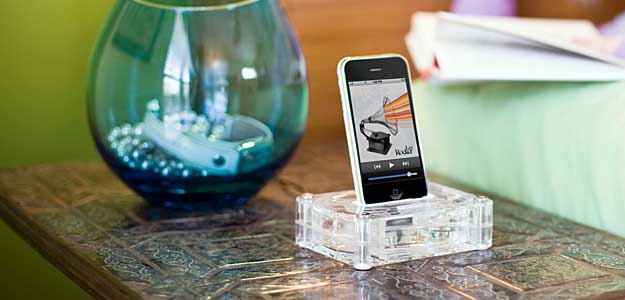
I have to admit that when I saw the AirCurve, I was a little skeptical. I received it as a gift for a class I gave and it took me days to even get motivated to give it a try. I just didn’t believe that simply amplifying the iPhone’s built-in speaker would be good enough. I finally decided to give it a try and I couldn’t believe it. It not only worked as advertised by amplifying the iPhone’s built-in speaker by 10 decibels, but it actually sounded decent. No, it didn’t sound as good as a good pair of speakers, but it definitely sounded good enough for use on the road in a hotel room. 

aircurve

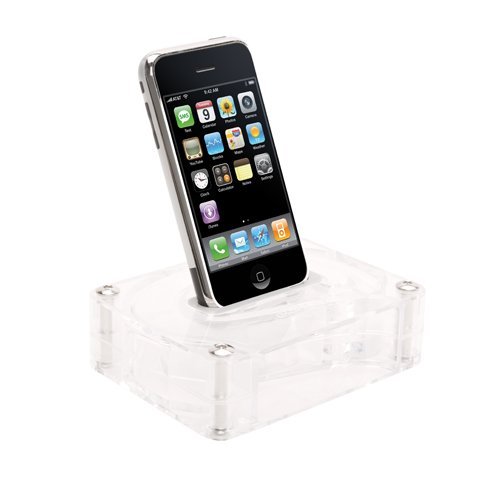
The AirCurve doesn’t have any electrical or moving parts and therefore requires no power. The AirCurve is designed to amplify your iPhone’s built-in speaker acoustically. It works with both the original iPhone and the iPhone 3g (comes with custom inserts for both models). They even designed it so that you can use your existing sync cable for power or docking with your computer while the iPhone sits in the AirCurve. I also like it because it’s well built, stylish and not flimsy. So it should travel well in a suitcase.

I also gave it a try using the iPhone’s speaker phone while it sat in the AirCurve. It worked fine. When I received a call, the music faded. I answered the call and pressed the speaker button. The person on the other end had no problem hearing me and of course I had no problem hearing them either because of the amplification.


The Bottom Line

The AirCurve works as advertised, no question about that. If you’re an audiophile or someone who likes bass, you’ll probably be a little underwhelmed. For everyone else, this is a great low cost solution for amplifying your iPhone’s speaker. Although the second generation iPod touch does come with an external speaker, it’s not as good as the one on the iPhone so it looks like Griffin didn’t bother making an insert for iPod touch users. The AirCurve retails for $19.99. Amazon has it for $13.33. At that price it’s a no-brainer.

Your mission, should you choose to accept it…

Although I consider myself pretty tech and gadget savvy, I can’t know about every gadget out there. Many of the readers of this blog have helped me over the years by suggesting products that were in some cases better than the ones I’ve reviewed or complimentary to them. So I decided to really put your knowledge (geekiness) to the test. I’m looking for a solution to a problem and need your help!


Wireless broadcasting from my DVR to another HDTV

OK, here’s what I’m looking for: I have a 27″ Toshiba HDTV out in my recreation area that is suspended from the ceiling. It has a built in DVD player and CableCARD so that I can pick up all my digital Comcast channels including HD content. I went out of my way to find this particular set because it was the most self contained HDTV I could find. My goal was to have as few cables/boxes connected to it as possible. Having a built-in DVD player on the side, meant not having to connect an external one. Having a built-in CableCARD slot meant that I could pick up all my Comcast channels without the need for a box from Comcast.  The only box I have connected to it is an Apple TV ,which is great for seeing my movies (ripped DVD collection), music videos, renting movies and iTunes purchased content. I’m just missing ONE thing! There are times that I’ve recorded shows on my TiVo HD that I would LOVE to watch out there. However, I don’t want to connect a big box (DVR). I love the fact that this set is basically boxless. I allowed the Apple TV because it mounts neatly on the wall (thanks to the tvTray). So what I would love is a wireless solution that would stream video from my TiVo HD to this set. 

I’ve looked at the new Slingcatcher, which would be ideal here except that it doesn’t stream HD (which I could live without) AND requires and Ethernet connection or yet another box to be wireless. I’ve also looked at the Belkin Flywire, but I’m not willing to give up my first born to pay for it (they must be totally kidding with that price right? C’mon, seriously?). So what am I missing out there?


Requirements:

The ability to stream video from either my TiVo HD or Comcast DVR wirelessly to another HDTV.

Willing to have ONE SMALL box attached if need be.

Can’t cost more than the HDTV, Apple TV and all the furniture in the room (are you listening Belkin?).

Icing on the cake (actually this is almost a must) would be that I would be able to use a remote to control the TiVo HD from the other room.


So let’s see how good you really are?! What say you tech community? This post will self destruct in 5..4..3..2……..

V-MODA Vibe Duo vs. Bose in-ear headphones

v-moda

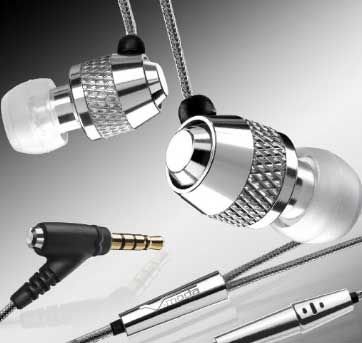
Last week I did a review of the NEW Apple in-ear headphones for the iPod. Today we’re going to move up a little in price and I’m going to compare two $99 in-ear headphones. I have used both of these headsets quite a bit, but in different places. I travel with the V-MODA Vibe Duos. They are my fall back earbuds. I like them because the sound is great, comfort is good and they also have an integrated mic and controls for the iPhone. This is why I travel with them. I use them a lot for handsfree calls in noisy places like airports. The V-MODA Vibe Duos come in 3 colors: Nero (black), Chrome and GumetalRouge (red).

bose

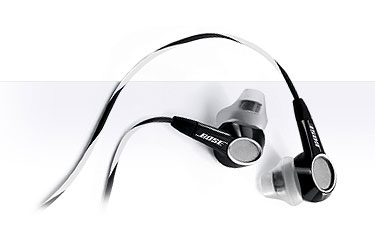
I use the Bose in-ear headphones mostly at home. They also sound good and the small cushions feel good for my ears. Also because they don’t have an integrated mic, I have no use for them with my iPhone. Although these are “Bose” headphones, I don’t really perform any better or worse than the Apple or V-MODAs. Don’t get me wrong, they do sound good, just not better. Because of the bigger ear cushion, they do block out more noise than the V-MODAs. My only real complaint with these is that the ear cushions tend to fall off too easily. As a matter of fact, I lost one because it came off and I couldn’t find it. So I had to order a replacement set. Bose sells the replacements (2 pairs) for $6.99.


The Bottom Line

My buying advice is that can’t go wrong with either of these. Both of these sound good for the $99 price. If you’re going to use them with an iPhone, then the V-MODA Vibe Duo are hands down the best choice. Amazon has the V-MODA Vibe Duo’s for $83.95. Amazon has the Bose in-ear headphones for $99.95.

EOS Multi-room wireless iPod Speaker System


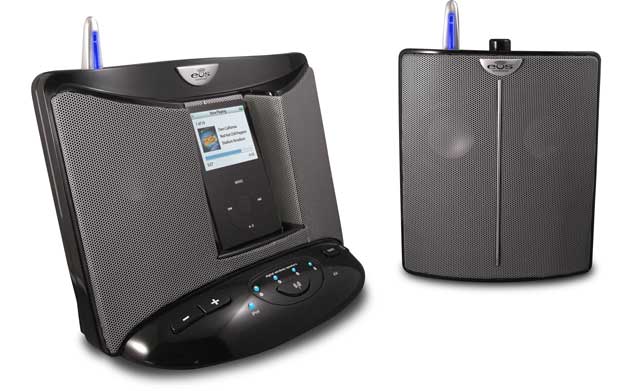
core_black

I had a very specific need to be able to hear the music coming from my iPod in 3 rooms at my photography studio. So I set out to find the best solution without spending a fortune. At home my solution is to use the AirTunes technology built-in to the AirPort Express and Apple TV units. However, that solution was overkill for my studio and more than I wanted to spend there. Plus AirTunes is for your computer/Apple TV and not your iPod. 


A quick Google search lead me to EOS


The EOS system was EXACTLY what I was looking for! EOS is a multi-room wireless speaker system for your iPod. The base unit resembles all the other iPod speaker systems out there where the iPod docks in the middle and you have stereo speakers on the sides. However, the EOS base unit has a built-in antenna that can broadcast the music wirelessly to up to 4 additional stereo speakers (5 rooms total). The base unit ships with one wireless stereo speaker. So out of the box you get a two room system. I wanted three rooms, so I ordered one additional speaker. The system doesn’t rely on wi-fi or any other network. It has it’s on 2.4GHz wireless setup. EOS advertises a range of up to 150′ feet. Think of it as a cordless phone like speaker system. So I’m sure the 150′ is under best case scenarios. Real world range is probably less.


How well does it work?

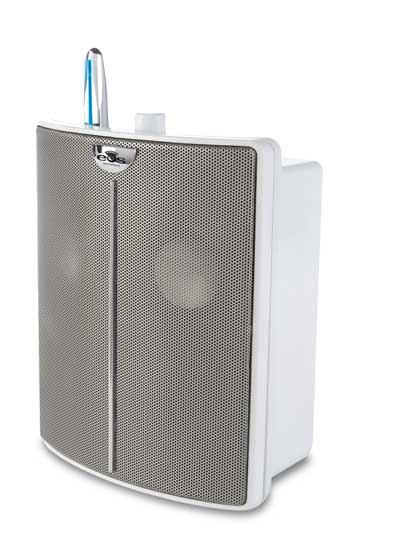
eos_white_speaker

The EOS system works exactly as advertised! Once you plug in the base unit all you have to do is take the additional speakers to your other rooms, plug them in and turn them on. The first speaker I turned on wasn’t detected automatically. I returned to the base and pressed the scan button and it detected it and paired to it right away. The second speaker paired automatically the minute I turned it on. The next thing of course was to dock the iPod and try it out. I docked my 3rd generation iPod nano, selected a playlist and started playing a song. The music was crystal clear. There was no distinction (to my ears) from the music coming out of the base to the music coming out of the wireless speakers. No static, no drop outs, no lag, no distortion!

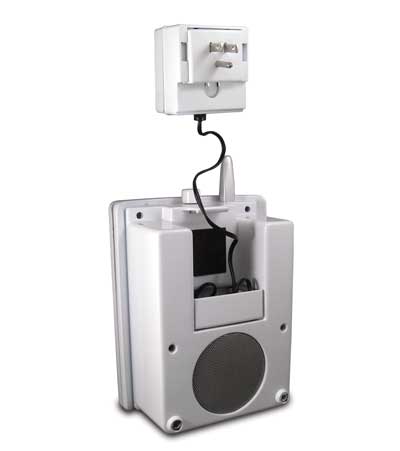
speaker_plug_back

The power adapter is integrated into the back of the remote speakers so that they can actually hang right from the wall outlet OR you can separate the adapter and plug it in while the speaker is on a shelf.


The EOS system touts what they call SRS WOW!™ digital sound enhancement technology, which aims to more bass and a 3D surround sound like atmosphere. In all honesty I can’t really tell that this is making all that much of a difference and since there is no way to turn it off I can’t really tell if it makes a difference or not. The system I’m replacing with this was the original Bose SoundDock which sounded really good to begin with. The EOS ships with an IR remote to adjust the sound volume, pause, advance, etc. the tracks. The EOS comes in your choice of Black or White and also ships with various iPod universal dock adapters for the older iPods.

It’s also not just for iPods! Although there is a built-in iPod dock, there is also an auxiliary line-in port on the back of the base unit. So you could plug in just about any audio source including your computer. This would also help iPod shuffle users. They even supply the cable you’d need to plug in another audio device.


The Bottom Line

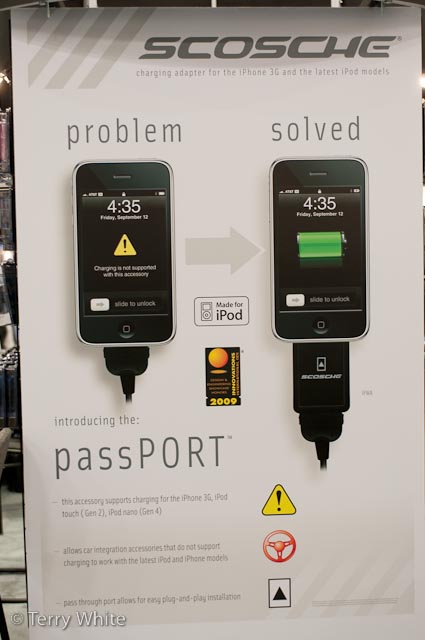
If you need to hear your iPod in multiple rooms in your home, office, etc. then it’s hard to go wrong with the EOS system. While I was prepared to pay their retail price, I was very happy to see that they offered refurb’d units at much lower prices. I got the base unit (which includes one extra speaker) and a second speaker (3 rooms in total) for only $218 (free ground shipping). That’s less than cost of a new base unit alone (at their retail price of $229). I do have a couple of issues with it though. The first one is that it’s not able to power the latest iPods/iPhones. If you have a 4th generation iPod nano, 2nd generation iPod touch or iPhone 3g, then you’ll see a message that “charging is not supported by this accessory.” You can solve this with the addition of the Scosche passPORT Dock. Hopefully, they’ll come out with a newer model that provides power over the proper pin in the dock connector for the newer iPods. The other issue I have is that while the additional speakers have an on/off/volume knob, I don’t see a way to turn OFF the base. Granted I never turned off my Bose SoundDock either, but the EOS base has blue LED lights on it that stay lit all the time and I don’t want others trying to figure out how to turn it off. So I just unplugged the power when I was ready to leave. I thought it was odd that the wireless speakers had the ability to be turned off, but not the base. To learn more or place an order, check out their site.

New iPod/iPhone, Old Speaker System, not charging?

If you have an iPhone 3g, 2nd gen iPod touch or 4th gen iPod nano, you may have noticed an issue with plugging them into your older speaker system. As I understand it, the newest crop of iPhones and iPods no longer allow charging over the Firewire pin in the standard 30 pin iPod connector found on hundreds of iPod accessories out there. They now only charge via the USB powered pin in the same 30 pin connector.

I first noticed this problem with my iPhone 3g. I noticed it didn’t work with the integrated iPod connection in my car. I could plug it in and play music through the car’s speakers, but the iPhone wouldn’t charge. Buy a new car? Not today! Some car manufacturers started offering a newer cable to correct the problem. Rather than wait for a new cable to be produced for my car, I was lucky to find out about the passPORT by Scosche.


passPORT to the rescue

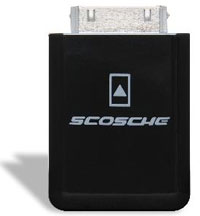
passport

The passPORT is an adapter that goes between your car’s cable and your iPhone/iPod. Since older iPods and iPhones can be charged over USB too, this adapter is backwards compatible. There’s really not much more to say about it. You plug it in and it works. Your iPhone 3g and newer iPods will now charge via your older cable. The adapter goes for $29.99. Amazon has it for $27.99. The price seems a little high, but it’s a lot cheaper than a new car 🙂

_tlw1396


What about your speaker system?

If you spent good money for an iPod speaker system, then chances are you want to keep using it. However, if you bought your speaker system a while back, then you may be facing the same issue I did above. Your older speaker system may not charge or work properly with your newer iPhone 3g or iPod. While I was at Macworld Expo, I stopped by the Scosche booth while I was at Macworld Expo to buy a second passPORT for my new EOS Wireless Speaker system (a review on that is coming). Although this speaker system is not that old, it’s old enough not to work properly with the new iPhone 3g or iPods. When I got to the Scosche booth I saw a display on the wall for their new passPORT Dock product.

passportdock

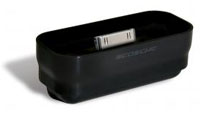
This adapter is designed specifically for the Universal Dock connector found in most speaker systems. As a matter of fact even Apple’s own (now discontinued) Apple iPod Hi-Fi system. When this system was being sold it retailed for $399. If you spent $400 on an iPod Hi-Fi, then you probably want to keep using it with your new iPod or iPhone 3g. Same goes for the original Bose SoundDock ($299). 

The passPORT Dock is a $40 adapter that sits right in your speaker’s universal dock connector. It sits up about an inch and has it’s own Universal Dock on top which will accept the standard Apple dock inserts that ship with the various iPods and are available for the iPhone. The passPORT dock comes in either white or black to match your speaker system. Again, I think $40 is a little pricey, but considering what you may have spent for your speaker system $40 is not much to keep using it with your newer iPhone/iPod.

You can order the passPORT Dock directly from their site.

Macworld Expo: Neat Receipts Update

I’m here at Macworld and I got a chance to check out the new software update to the Neat Receipts scanner that I reviewed in 2008. One of the number one questions I got then was “can the software (which rocks) be used with other scanners like the Fujitsu Scan Snap series. Now the answer is YES!

Macworld Expo: Joby Gorillapods

I’ll be posting some video updates over the next day or so of cool things I’m checking out here at Macworld Expo. I’m going to start with a product I’ve been meaning to review here. It’s the Joby Gorillapod SLR. Although this is a great portable, travel tripod for your Digital SLR, I found out today that it has some other cool uses. Check it out!

So what’d you get?

whatdidyouget

I’ve been reviewing my favorite gadgets, services and apps all year long. Now it’s your turn! Tell us what you got this holiday season (tech wise) that you’re excited about? Use the comments section below. Tell us what it is, why you like it and provide links if you can? Did you get or give anything from my holiday gift guide?

Epson P6000 Multimedia Viewer/Backup Review

One of the things that photographers are constantly concerned about is backing up their photos. While it's pretty easy to do if you're in the studio, it's more challenging when you're out on location. For this reason I have been using Epson Multimedia viewers for the last couple of years. These devices are pretty cool because they are small enough to fit in just about any camera bag and have just about all the functions you would want.


What's built in?

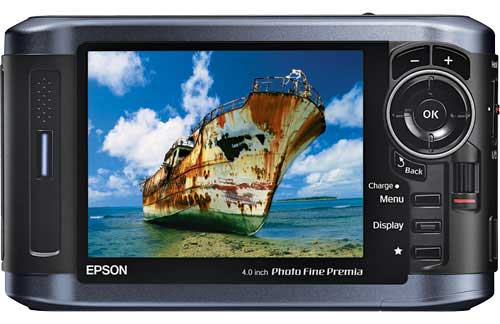
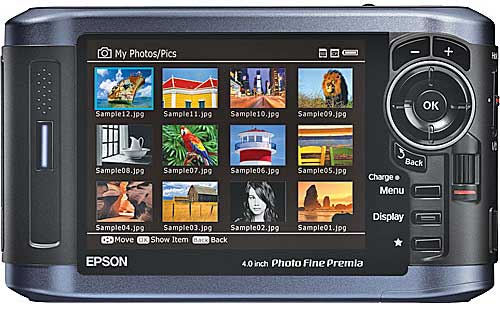
First of all they have a built-in hard drive. The current models come in either 80GB or 160GB capacities. They have a high quality 4 inch LCD screen and both Compact Flash and SD slots built-in. After a shoot you simply take the card out of your camera and put it in the Epson Multimedia Viewer.
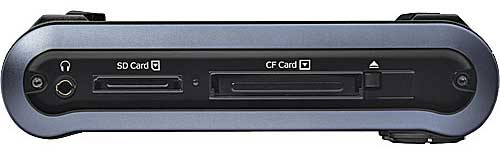


Execute the Backup command and it will copy the photos from your card onto its built-in hard drive. Put the card away, don't erase it! The whole point of a backup is to have your data in two or more places. If you erase the card, then you are still vulnerable because the photos will only be in one place.


What other features does it have?

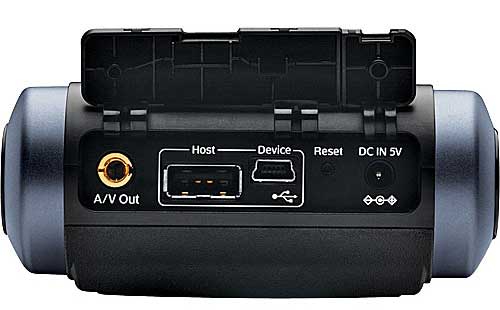
The Epson Multimedia Devices can also play music which is handy for doing impromptu slideshows. You can have your MP3 files already on the device and be ready to play them. The other more important feature is that these devices support Camera RAW files (yes, of course it supports JPGs too) from the most popular cameras today. This means that you can not only backup your cards, but you can use its 4 inch screen to display your pictures. Both the P6000 and P7000 now support 94% of the Adobe RGB color space which means you'll be seeing your photos more true to the way they will actually print instead of the striped down sRGB color space. Lastly there is also video/audio out jacks so that you could hook up your P6000 or P7000 to a TV or projector to show your work on the big screen.
 

How well does this device perform?

I've had my new one for a few weeks now and I have no real complaints. The backup speed is acceptable and I haven't had any card/image compatibility problems. It seems that with my P3000 there were certain CF and SD cards that couldn't be read (mostly the cheaper off brand cards from friends). Navigating the images is done via a jog wheel, which after working with an iPhone for the past year seems kind of archaic now. I would love to be able to "flick" my images by. Speaking of the interface, it has improved a little since the P3000, but it's time for an over-hall. There are still too many screens, menu options to get to what you want at times.


What about the price?

Here's the biggest problem of them all. These devices are best in class and you'll pay a premium because of that. They are, in my opinion over priced. The 80GB Epson P6000 lists for $599.99 (yes $600 bucks). The 160GB Epson P7000 lists for $799.99 (nope, it's not a typo, $800!). Considering the cost of storage these days and the fact that I don't imagine that there was a ton of RD that went into these latest models, they are easily $200 over priced. Now I have no idea what these cost to manufacture and it's quite possible that I'm missing something here. I admit that. However, there are full blown PC laptops on the market that cost less. For example, here's a Gateway/eMachines laptop that comes with a 160GB hard drive, 15.4 inch LCD, 3GB of RAM, Keyboard, DVD burner, and wireless networking for $599.99. Is this a quality laptop? Probably not, but the fact is it has more components and costs less. It seems that Epson keeps increasing the storage, but never lowers the price. 


The Bottom Line

Although these things are pricy, I do LOVE my P6000 and would never think of going on location for a shoot without it. Once I get back home, I can either copy the cards again to my computer or I can simply plug in my Epson P6000 via the USB cable and copy all the shots that way. Since it does mount on the desktop as a hard drive, I can easily copy my portfolio to it to show perspective clients. Do I recommend them? Yes, if you have the budget for it. They work as advertised and have never let me down. Battery life is decent too and the rechargeable battery is removable and user replaceable. As far as which model to get, I can't really see much of a reason at all to get the P7000. Granted you do get double the hard drive space, but it will also cost you $200 MORE! Seeing how I doubt that I would ever shoot 10 8GB cards worth of shots in one setting, the 80GB model is plenty. I'm also remind that the model I upgraded from only had a 40GB drive and that was never too limiting for me either. So 80GB is more than enough. As for as room for improvement goes, for the prices that these are going for I would at least like to see some wireless/Wi-Fi transfer options. Even an EVDO 3g card slot would be nice too. That way I could not only back up my photos, but I could email them directly from the device to someone. Amazon has the Epson P6000 for $579.20 (or less) and B&H has the Epson P7000 for $799.95.


Happy Thanksgiving & Black Friday ’08

With all that’s going on in the world, I’m very happy with my life. I want to take this opportunity to wish you and your family a very Happy Thanksgiving!


Black Friday 2008

Well it’s here again! The day that retailers compete for your business. I do my best to avoid this madness at all costs. Last year was the first year that I went out shopping on Black Friday in YEARS! I just could resist the deals on GPS units at Staples. However, this year there is nothing tempting me. Nothing at all. So I plan to sleep in. I do know that many of you like deals and like gadgets (after all, that’s probably why you’re reading this right?). Before we get to the deals you might want some recommendations on cool stuff to bet. So check out my Holiday Gadget Gift Guide and my recent appearance on The MacJury. Now let’s get to the deals. Here are a few random Black Friday deals/sites you should check out:

First of all here’s a site that does a pretty good job of accumulating many of the Black Friday deals in one spot. It’s called Black Friday Gotta Deal.

The next one is Amazon.com. Since I HATE standing in lines, nothing pleases me more than to get good deals from the comfort of my chair. Check out Amazon’s Black Friday Deals.

Of course Apple products are always hot items on anyone’s list. So check out Apple’s Black Friday deals too.

Here are some deals at one of my favorite local computers/electronics stores – Micro Center.

I’m a Nikon shooter so I received a mailer with Nikon’s Black Friday Deals.

If you’re a video enthusiast then you probably want to check out The Video Guys.


Lastly, be sure to check out the Consumer Reports Electronics & Computers Gift Guide.


Enjoy!