iPhone App of the Week – Units

units

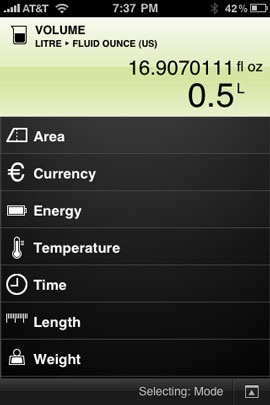
One of the first things I went in search of when 3rd party apps made their way onto the iPhone was a good unit converter.  I found Units and haven’t looked back since. This app has evolved over time and the user interface continued to improve. 


units1

Units can convert

  • Area
  • Currency
  • Energy
  • Temperature
  • Time
  • Length
  • Weight
  • Speed
  • Pressure
  • Power
  • Volume
  • Data Storage
  • Fuel Consumption
  • Typography
  • Density
  • Astronomy
  • Torque
  • Luminance

Continue reading “iPhone App of the Week – Units”

No ExpressCard slot, no problem

_dsc0127

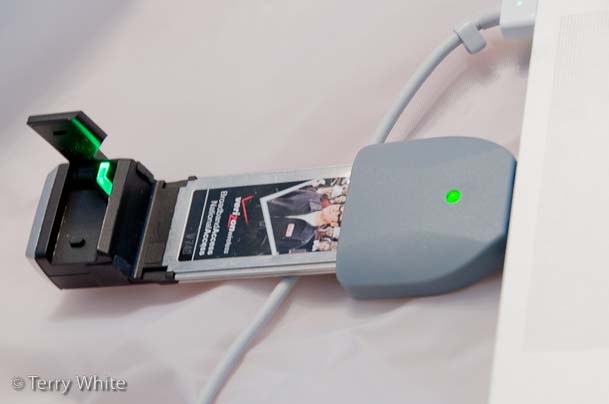
I must admit that I was a little taken back by Apple’s decision to eliminate the ExpressCard slot, in favor of an SD slot, from their New MacBook Pro 15" models. However, I can’t argue the reasoning. If most buyers aren’t using this slot then it probably does make since use the space for something more usable like an SD slot although personally I would have preferred a Compact Flash slot on the Pros and an SD slot on the regular MacBooks, but oh well. Then I got to thinking about the ExpressCard devices that I currently use and realized that I only have 3 of them. I have a Verizon V740 EVDO 3G Modem, a Synchrotech ExpressCard Compact Flash Reader and a Belkin Multi-Card Reader (reads SD, Memory Stick and a bunch of other formats). Although I don’t have any plans of getting a new MacBook Pro anytime soon, I like to be prepared by transitioning my peripherals to the new standards ahead of time so that when I do upgrade, it will be a lot less painful. Well the good news is that I can live without the Compact Flash reader because I already have a Firewire 800 Compact Flash Reader by Synchrotech that I use most of the time anyway. I could also live without the Multi-media Reader because the New MacBook Pros will have an SD slot built-in and I so rarely use the other formats supported by the reader that I could have a USB reader if need be. However, there is the issue with my Verizon ExpressCard Modem…

  Continue reading “No ExpressCard slot, no problem”

iPhone App of the Week – RunPee

runpee

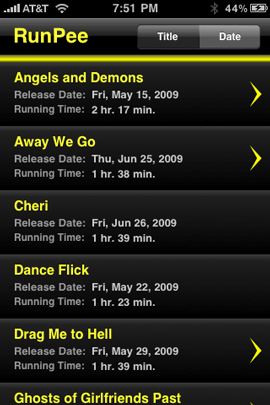
Sometimes I run across an app or someone shows me an app that like a train crash, I just can’t look away from. If someone would have said, "hey go download the RunPee" app!" I would have thought they were crazy or even a little sick. Well my friend Wanda sent me an email about this app and I had to go check it out because I trust her opinion. First off get your mind out of the gutter 🙂 It’s not that kind of app!

runpee1

Continue reading “iPhone App of the Week – RunPee”

iPhone App of the Week – Remote

remote 

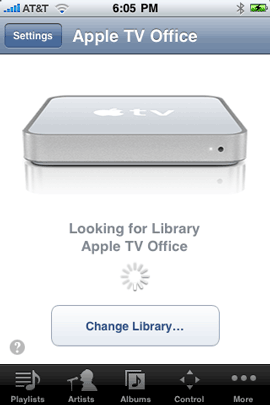
I can’t help but talk about this app! It’s so cool. The Apple Remote app has been one of my favorites since it shipped last year when iPhone 2.0 came out. Over time it’s had updates to make it better, however Apple just updated it to version 1.3 this week. With the 1.3 update you can now completely control your Apple TV. There has been Apple TV support for a while, but the support had been limited to just choosing content to play and using your iPhone’s keyboard to key in text when prompted to for things like passwords and searches.
remote1   remote2

However, 1.3 now brings multi-touch to the Apple TV. You can use your finger to swipe left, right, up and down to navigate the menus. Since you have access to the menu, you can really do everything that you would do with the supplied remote. You’ll need to run the latest software update (2.4) on your Apple TV before you’ll see the new interface. This feature also requires the iPhone OS 3.0 update on your iPhone or iPod touch.

remote3


Not just for Apple TVs, It’s all about iTunes
remote51

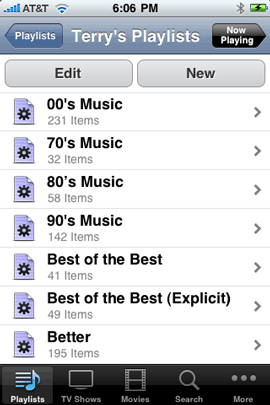
The main reason behind the Remote app is to give you a Wi-Fi remote to control your computer running iTunes. The concept is simple. You launch iTunes on your computer. You pair your iPhone/iPod touch’s Remote app with your copy of iTunes and from that point on you can see all of your playlists, songs, movies, etc. and control their playback. If you have multiple Airtunes speakers, you can even control which ones (rooms) will play the music. Also since it’s a Wi-Fi based app, it doesn’t require line of sight. You don’t even have to be in the same room as your computer.


Everyone’s a DJ
remote4 

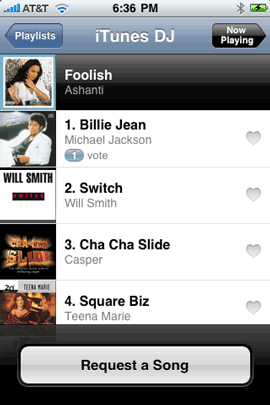
Another feature that was added to the Remote app is the ability to allow any iPhone or iPod touch on your Wi-Fi network to give input by voting for songs that should be played next. So imagine that you’re having a party and you’re playing music in iTunes from your Mac or PC through your stereo or Airtunes connected speakers. Anyone at the party can join your Wi-Fi network and then open their copy of the Remote app. Without needing any special login or password, they can access the DJ feature and request songs to be played. The more people that request the same song, the higher priority it gets on the list. 


The Bottom Line

If you play music and other content via iTunes on your computer and you have a Wi-Fi network, then you should definitely have the Remote App. If you have an Apple TV, then it’s a must have! The Remote app is a FREE download from the App Store.


iPhone 3G S Review and a little fun with Woz

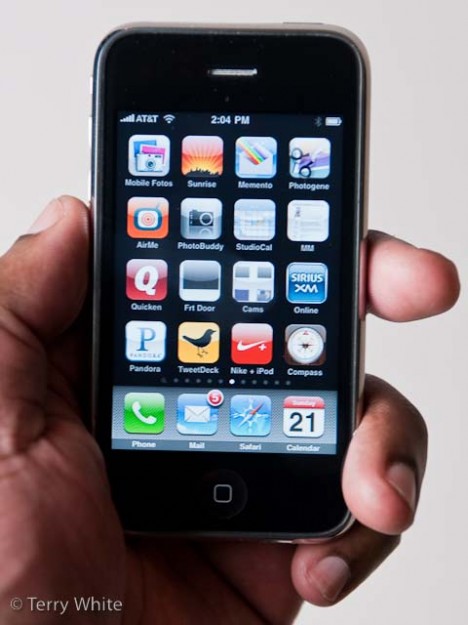
iphone3gsinmyhand1 The iPhone 3G S is Apple's newest offering for an already insanely successful product. The iPhone's success has exceeded everyone's expectations and even the naysayers can't deny that Apple came from nowhere and all of a sudden became the market leader that every other phone maker now aspires to be like. If you don't believe me, look at all the other smart phones that were recently released and you'll see "me too" like features and advertising. So what do you do when you have one of the most successful phones ever created? You improve it to keep the momentum going. My original iPhone review 2 years ago has had over 135, 000 reads. If you Google "iPhone Review" mine will come up on the first page. The reason for this success is that my first review was one of the most in depth reviews written. I spent almost 24 hours writing it. Then the iPhone 3G came out last July and I followed up with another in depth review. Now it's time to take a look at the iPhone 3G S, however, this review will not be anywhere near as long or in depth as the last two. It's not because I don't feel like writing, it's just that there isn't as much to cover that I haven't already said. If you have read my iPhone 3G review last year and my iPhone OS 3.0 Review a few days ago, you're 95% there in knowing about the New iPhone 3G S. (Also see my iPhone 3G S Unboxing Video here). Continue reading “iPhone 3G S Review and a little fun with Woz”

Unboxing my iPhone 3G S 32GB

Well today is iPhone 3G S day and while I have a full review coming sometime this weekend (no later than early Monday morning), I thought I would share a first look at the outside of the iPhone 3G S in this video. Now keep in mind that the on the outside the iPhone 3G S is pretty much identical to the iPhone 3G form factor:

iPhone App of the Week – Helper Apps

I often come across great apps for the iPhone/iPod touch that work great and are very exciting to me, however there’s a problem. Some of these apps are really only useful to people that have a certain piece of hardware or a certain piece of software on their computer or use a certain service such as a particular bank. If I make one of these apps the iPhone App of the Week, then chances are the app will only appeal to a small segment of my readers. So rather than profiling an app with limited appeal or ignoring the app completely (as I have done in the past), I figured I would group them together from time to time in one post so that there will be a greater chance in seeing something that you can use. So welcome to my first “iPhone App of the Week – Helper Apps!” Here are 10 of my favorite Helper Apps:

Continue reading “iPhone App of the Week – Helper Apps”

iPhone OS 3.0 Review: What’s New and Noteworthy?

iphone30update

Now that the New iPhone OS 3.0 Software update is available, I thought I would give you a first look and point out some of the new features that you may overlook or not discover right away. The good thing is that at first glance iPhone 3.0 looks just like iPhone 2.x. This is what makes it hard to know what’s there because there isn’t a lot that jumps right out at ya. Also hundreds and hundreds of the enhancements are under the hood to improve performance and give developers the hooks to write more powerful apps.

Continue reading “iPhone OS 3.0 Review: What’s New and Noteworthy?”

iPhone App of the Week – 6500+ Cool Facts

coolfacts

This one is for the trivia buffs (or to combat them 🙂 ). Cool Facts is an iPhone (iPod touch) app that now boasts 6,500+ Cool Facts. I was actually surprised by some of the entries. Not that I think I know a lot about a lot of things, but some made me go “wow, I’d never heard that before!” This app is a great conversation starter (please resist the temptation to use it on a date. You know who you are).

fact1 fact2

The app displays the facts in a random order. You can swipe your finger to go to the next fact or shake your iPhone/iPod touch to go to the next one. It seems that shaking is actually a little more responsive than swiping.

fact3 fact4

6500+ Cool Facts is a FREE download from the App Store. Get it here.
fact5 fact6