

I’ve done posts here in the past showing various ways to shoot tethered to a computer or to an iPad. When I got my Nikon D4 I popped for the WT-5A Wireless Transmitter too. While it works perfectly, it’s not as fast as a wired connection. Since the D4 has a 10/100 baseT Ethernet Port built-in I decided to give it a shot and shoot tethered via Ethernet.
Understanding the difference…
Most Nikon and Canon DSLRs are supported natively by programs like Adobe Lightroom for USB tethering. That means you just connect the camera via a long USB cable and the software can bring in the images as you shoot automatically. However, when it comes to non-USB connections such as WiFi or Ethernet, this support is usually NOT built-in. Nikon’s Wireless Transmitter Utility will enable you to bring the images into a folder as you shoot, but then in order to get them in Lightroom you have to use the Auto Import feature in Lightroom. Keep in mind that this adds a second or two to each image import vs. native USB support. However, with that said Ethernet is still faster! With USB tethering my 16.2 MB RAW files typically take about 6-8 seconds to come in via USB. When shooting via Ethernet, they actually come in in batches of about 6-7 images within a few seconds. My guess is that there is some overhead from the time files get dumped into folder before Lightroom sees something new and then imports them all at once. Also the Ethernet connection is a lot less fragile than the USB connection I’ve used in the past. 😉
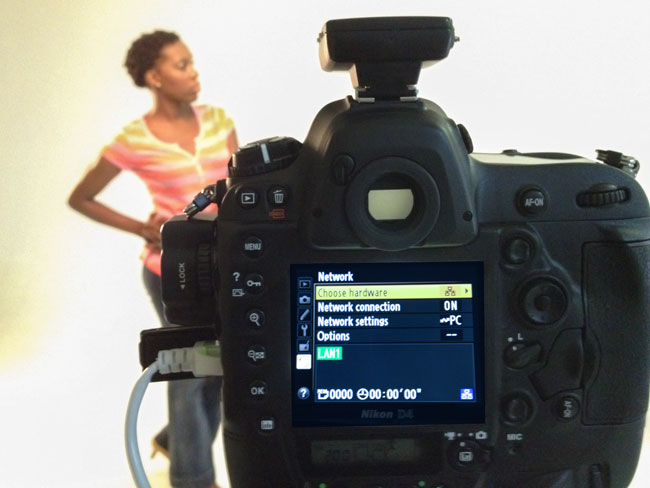
The D4 allows you to switch between a wired or wireless connection via the Network menu. This means that I can disconnect the 100′ Ethernet cable that I bought and go wireless via the WT-5A module without skipping a beat. Wired or wireless, the images are going to the same Watched folder that Lightroom is looking at.
The Bottom Line
If you use the D4 in a studio environment and you shoot tethered, you definitely want to give Ethernet a try. Rather than going through a switch/router, I have the ethernet cable plugged directly into my MacBook Pro for the fastest possible connection. It would have been nice to see a Gigabit Ethernet port considering what the D4 costs, but the 10/100 baseT connection is still pretty fast.
Thanks for sharing this. Nice to know it works so smoothly. Have you tried controlling the D4 from the computer? see: http://www.theverge.com/2012/1/10/2697264/nikon-d4-network-accessible-wireless-control-demo
I stopped complaining about the price when I learned the D4 has a built in Web Server! That is a full-fledged computer in a camera! I hope the D5 has a phone built in, then I can stop carrying around my iPhone 😉
I would love to see how this setup is used to the iPad. Since you can’t plug directly into a iPad, does it need to be set up on a wireless router. Curious. I would love to have the photos sent straight to the iPad.
Hi Terry, by all acounts, the D4 does have a GigaBit ethernet port. Bob
Where are you finding that? Everything I see shows 100baseT:
http://robgalbraith.com/bins/multi_page.asp?cid=7-11673-12223-12224
http://www.imaging-resource.com/PRODS/nikon-d4/nikon-d4A.HTM
http://nikonglass.blogspot.com/2012/01/nikon-d4.html
Sorry, Terry – I’m wrong. Most people on the internet have been quoting GigaBit, but I guess that’s simply a case of them repeating what they’ve read elsewhere. I’ve just this moment emailed Nikon UK, and have received the following reply:
Dear Bob,
Thank you for your email. I would like to confirm that the ethernet port on D4 is capable of operating the 10/100 base-T connection speed only.
Aleksander Nowak, Nikon Europe Support
http://www.europe-nikon.com/support
Even Wikipedia (UK) states Gigabit!
I’m interested, as I want to try my D4 tethered – never done this before, and as I have a Gigabit card in my PC, I was hoping to obtain a GigaBit connection. Looks like I’ll have to use a standard 10 metre, 10/100 base-T CrossOver cable now.
Thanks Terry,
Bob
Thanks Terry
Hi, tomorrow ill recieve my wireless router on battery’s
TP-Link TL-MR3040 Portable Wireless-N
witch is capable of creating a mobile wireless network.
I’m curious if this setup is gonna work.
So this will be a beautifull cheapy alternative for the WT-4/5
Other options can be a Mifi network with 3/4g so you also be able to send your jpg. Files right from a location to a client.
This would be nice if a WT-6 can have this all in the future.
Hey Terry, thanks for all the valuable info. I have to stop reading your posts as they usually end up with a purchase at B&H. Keep up the good work!
I use a Netgear WNCE2001 and Mophie Powerstation Gen 2 which works quite well.
D4 Wireless Tethering,
Terry, when connected directly to your MBP did you have to use a crossover cord? Or did you just set up a virtual network?
Macs have had autosensing/switching Ethernet ports for years. No crossover cables necessary. I plugged in a standard 100′ Cat 5e Ethernet cable and enabled Internet Sharing from WiFi to the Ethernet port.
Hey thanks! I actually set it up over a wireless router last night and it worked perfectly. I was going to try the direct connection to my MBP, then remembered Apple thinks the entire world is already wireless and stopped putting ethernet ports on the MBP’s. Maybe I’ll get the USB adapter and try sometime. Thanks for the info though!
Just come across this article as I need to capture shots at a football match and send them to the papers really quickly. I was beginning to think the only way I could tether was via USB to Lightroom, which I didn’t like as it didn’t write to the cards as well. With this I can have the photos on the card as well, just in case. Thanks Terry.
Hi Terry. I’m trying to set up my D4/D4s to my Macbook Pro using the Ethernet cable to do Live Ingest in to Photo Mechanic. I’m really struggling to connect the two and, at the point where I need to connect a USB lead, I get told I need to change the USB port type. This cannot be done n these cameras!! Totally stuck even NIkon’s NPS could not help.