


Wow! There certainly has been a lot going on in the press about the iPhone 4's phone reception issues. Any time you sell millions of anything you're going to have a percentage of users that have issues with it. Especially if the something you're selling is created under a veil of secrecy that may inhibit testing under a wide variety of conditions. For the record, I can't repeat the "cosmetic" signal strength indicator problem. I've covered the little black strip areas with my fingers and I've held the iPhone 4 as tightly as I can and at the most I saw a brief one bar drop in signal on the display that I couldn't even repeat. However, although I can't repeat what others are saying is happening doesn't mean that there isn't a reception issue! It also doesn't mean that just because I can't make it happen that others aren't having a real problem. I will say that out of all the iPhones I've ever owned (all models up until now), that prior to putting the "Bumper" on my iPhone 4 I dropped more calls on my iPhone 4 than all my other iPhones combined in the same locations that I always call from and calling the same people that I always call! I've also had random disconnects and reconnects using my Jawbone ICON bluetooth headset that I never had with my 3GS. So there is definitely something going on there and it's not just how the bars are displayed on screen. Again, you may not be having a reception issue at all and you may have the best signal strength and call quality that you've ever had, but that doesn't mean that it isn't happening to others. So please don't tell me about how just because it's not happening to you, the problem doesn't exist!
Speaking of problems that not every iPhone 4 is having:
Is there a White Balance Issue with the iPhone 4's Camera?
On my iPhone 4 there definitely is a problem and I'm not alone. If I use the camera outside, the pictures are great! No complaints. However, depending on the lighting situation inside my pictures will have an extreme yellow tint to them. As a photographer and video enthusiast one of the main reasons I upgraded to the iPhone 4 was to get the better camera AND HD video recording. Since the problem is in the way the rear camera interprets the light it also affects any video shot too. Once again, this isn't happening to everyone. My buddy Jack Beckman has NOT been able to reproduce this with his iPhone 4. Even on mine it doesn't happen in all cases. For example, I took a shot in my dining room the night I got my iPhone 4 and it was pretty much unusable as everything and everyone was YELLOW. However, the next day when more sunlight was coming in the window, the pictures came out great. Using the camera flash doesn't seem to matter much. I took this shot in complete darkness and for the most part, except for the Sony label on the tripod the white balance is fine.
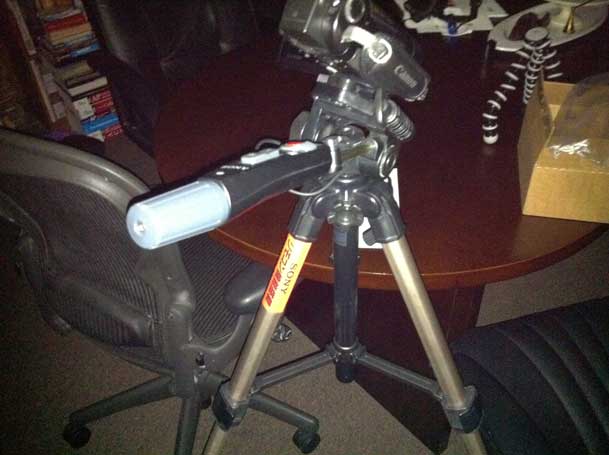
However moving down the hall, with the overhead lights on I'm getting yellow city.
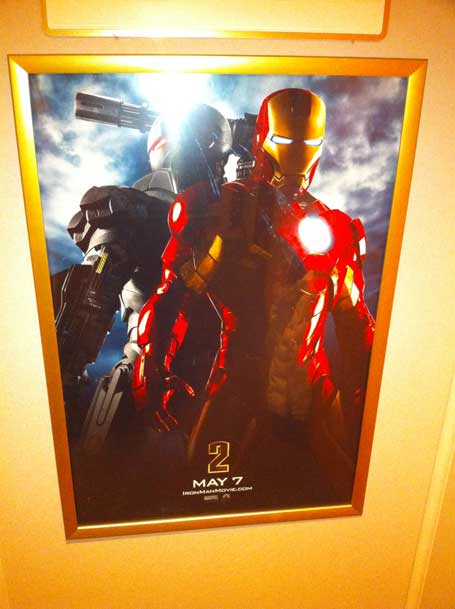
The sign above the poster by the way is supposed to be white.
It's not happening on both cameras
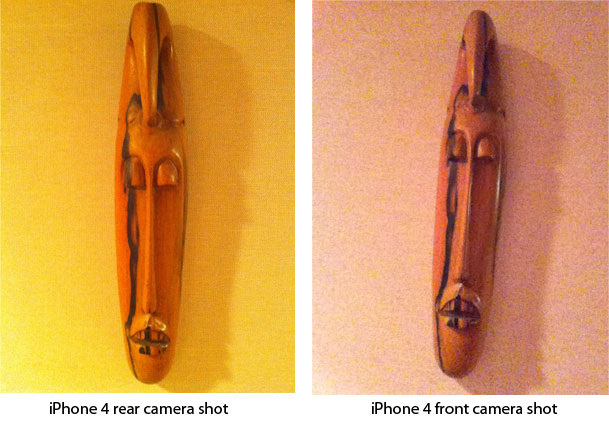
The weird thing is that this is only happening on the rear (5MP) camera. If I take the same shot with the front facing camera, the shot is fine.
It's not just me
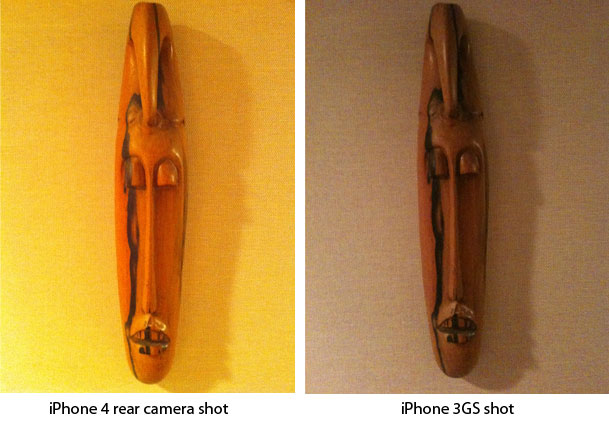
Like I said, this is not unlike the reception problems. Some are having it, others aren't. However, Macworld published this report on the issue and you can check out this discussion thread on Apple's support forums.
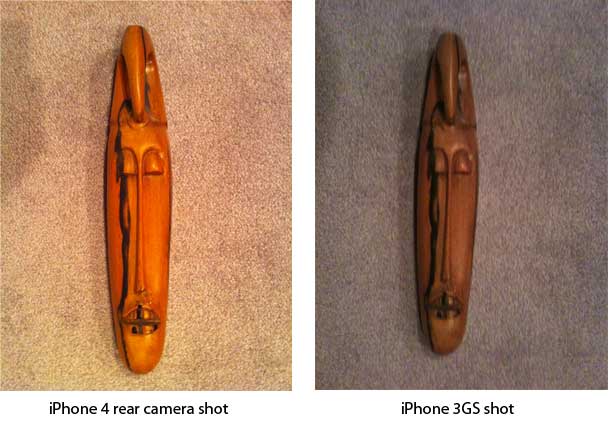
Here's another example taken in a different room with the artwork laying on grey carpet. The iPhone 4 does better here, but the iPhone 3GS is closer to the right color/white balance:
Can't you just correct it on Photoshop?
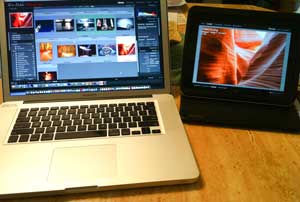
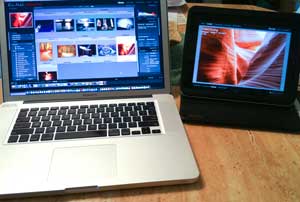
Absolutely. I can correct these shots usually with one click in Photoshop CS5's Camera RAW or Lightroom 3. However, that's not a solution and what about video? The camera should have either a better auto white balance out of the box or at least allow me to change the settings. Since Apple will unlikely give us that kind of control (after all Apple knows best), then they need to fix this for the people that are affected by it.

A Quick Tip: Using the FREE Adobe Photoshop.com Mobile App for iPhone you can fix most of this by lowering the saturation of the shot . Again, I don't view this as a permanent fix, but if you're needing to take a shot and send it immediately from your iPhone 4, it's better than living with the Yellow. Grab it here from the 

Why not just return it for a replacement?
Usually when you have something that is defective you just return it for a replacement right? However, it's not so easy in this case. If this were just a camera, I'd walk up to the counter at the camera store and say "take one out of the box and make sure it works right before I leave the store." With the iPhone, you can't test or use it until it's been activated. While that's not too big of a deal I also discovered upon visiting my local Apple store recently on another issue when I took my iPhone 4 out just to check for the problem, it doesn't exhibit this behavior under the stores lights. So it would mean leaving the store to test it, or bringing a light box and setting it up to test the replacement. Looking at the discussion forum on Apple's site, some have gone back and forth as many as 6 times and still not gotten a working one, where others either never had the problem or got lucky on the first replacement. Honestly, I just don't have that kind of time. I'm hoping that this is something that can be addressed in a firmware update. However, if it's not addressed within my 30 day purchase window I will bite the bullet and make as many trips to the store as it takes to get a working camera. Nonetheless I'll also make an official report of this issue to Apple Care so that they have another user on record with the issue.
Oh and yes I did remove the protective film from the back of the iPhone. I can't believe you were going to ask me that. 🙂
It's a camera phone! As a pro photographer why do you even care?
If you think that you can't get good shots from a "camera phone", think again and check out this link to see what can really be done with an iPhone camera. They didn't even use the iPhone 4. It was a 3GS.
httpv://www.youtube.com/watch?v=TOoGjtSy7xY
Forget the velcro, use this iPhone tripod mount for the 3G/3GS.
I have the new iPhone 4 but my pictures are coming out cool blue IN THE CENTER. ??? http://www.flickr.com/photos/glennbatuyong/4754655919/in/photostream/ (note w/ and w/out LED flash)
Glenn, make sure you remove anything from the back of the phone. The clear protective plastic and any case that you have that is covering the back. Some are saying that some cases don’t allow enough room around the camera’s lens to shoot properly.
My wife’s iPhone 4 has this problem. Especially with flash on. My 3GS is fine. Wonder if I should take hers back?
Terry, on camera issue with the iPhone4 I have contacted G Design LLC about an iPhone4 version of their tripod holder and they have something in the works. Hopefully it will be out soon! Just an fyi on that. Jason
Is the iphone4 the new Mac lc? Ios4 is the new Mac is 9.
The lc was woefully underpowered and loaded with quirks and problems from audio to video and even items that worked well on prior macs were destroyed in the lc. In my opinion the pizza box was the worst thing apple ever made
This brings me to ios4. If you had a perfectly working iPhone 3G. And upgraded to ios4. You now have a product so unstable, so slow and so unreliable, it has me delayingy purchase of any apple product. And coming fe me, apple has to screw up really bad to have me saying that.
I had reception problems with my 3GS and returned it twice. Apple was great about it both times. I think it is worth it to exchange as many times as it takes.
I am holding out for Verizon. My 3GS works fine except for ATT dropped calls.
My iPhone 4 won’t display geotagged locations in the Photos app until after I shut down and restart the phone each time. Even then, it’s as though it’s used cell tower triangulation to determine location vs. relying on the GPS chipset.
Not sure if I should take it back to replace, but have seen this working properly in other iPhone 4s.
There is a fix for iPhone4 out right now that solves all of these problems. What you have to do is open up your browser of choice and go to the AT&T website. The update is called “android” and you need to return your cellphone (and maybe kill your AT&T account since that is part of the problem). I highly recommend it.
Besides the time I save not having to run back and forth to Best Buy for a phone replacement, I can’t count the minutes I have saved by simply speaking out my text messages and have Google transcribe my messages for me. The same goes for web search, phone search and map search… fat-thumbing it is so last season!
Oh, and my Evo takes amazing photos and great video (but honestly, my Canon t2i and XH-A1 is what I use for photography and video). For $80/month you can get an Evo (for $199) on Sprint and get unlimited texting and data and cell phone calls to any cell phone no matter what cell phone network you are calling. Let’s see your AT&T phone do that!
Did I mention 4G? While you are waiting to download an iPhone firmware update (that will never come) over 3G, I will be watching live TV and video chatting (without the iPhone 4 WiFi requirement) in 4G ten times faster.
Terry – this is the universe telling you to go try an Android device!
Steve, that’s cute. While I will definitely be on an Android device before summer ends, they are far from perfect either. My Android bearing friends complain about their “different” issues too. So no device is perfect.
I am really looking forward to your review of the android devices. And I do agree, Androids have their own issues. At the moment I can honestly say… not as many issues, but they do have their own.
Enjoying your blog,
Steve
Thank you for your article. Just some observations and maybe insights:
– iOS 4 programming API’s give the programmer full access to the built in camera, including access to RAW, manually setting the white balance, etc. I suspect Apple did not add many features to keep the basic application UI easy as well as to encourage more advanced 3rd Party Apps.
– Auto white balance is a software algorithm which can get confused by certain kinds of indoor lighting. The best thing you can do is note the type of light source: LED, Flourescent, filament, etc. and then file a bug report with Apple, who can then adjust their algorithm to handle that source lighting better for the next dot release.
– iOS 4.0 in many ways is just a .0 release. I expect .1 to fix many of these issues. Especially since they are software issues. Which should be comforting to any iPhone 4 owner, the product will get better with each iOS dot revision. iOS 4.0 saw a major rewrite (refactoring) of the underlying code base and the addition of 1000’s of APIs. It is a “rethinking” of the Apple mobile OS. To support this statement, I point you to the addition of Grand Central Dispatch and the Block programming model now available in iOS 4. Apple’s frameworks have been re-factored to give the system layer control of the thread pooling. So a lot of work went into the “hidden” aspects of the system. It’s a major feat that while providing a major upgrde, will still require fine tuning.
Like you said, they are selling millions of them, so every issue will be exagerated, as it should. This should allow Apple to fix and refine iOS.
I have had my issues with the Iphone 4 I am on my third phone. First one camera had no sound, second one had a crack in the glass and this one will not sync up to any of my stereos. I have had the same issue with the IOS 4 so I am thinking this is an issue with IOS 4.
I have not noticed a white balance issue at this time.
What I find interesting is folks who have been a bit blinded by some of the lack of features and possibilities due to “Apple defining the user experience” that now are piping up a bit saying hey how come I cant change this myself?. I have a 3Gs and its an OK device but there is a lot of room for improvement (some of that came in OS4 which I am scared to death to implement at this point). In my experience folks who feel its the best phone ever are people who never really had a smart phone and never push their devices. While I have no love of ATT I can tell you I work with a guy who uses a BB on att and most of the places I drop calls or have very little signal he is just fine. So while I will not sing the praises of ATT nor BB for that matter, I would hazard to guess its as much Apple’s design as it is the network (im talking 3Gs and prior here).
I don’t want this to sound like I’m being an “Apple apologist”. This is really intended as a question.
Looking at reviews of high end DSLR’s from Canon and Nikon (thinking of those on DPReview) the auto white balance results are notoriously bad. So isn’t this a well known issue for all or most digital cameras? I CAN see the issue as one of needing to acknowledge this by providing adjustable WB, though.
SteveP, to answer your question: yes white balance in general can be off (bad) by the manufacturer. However, since Apple gives you no controls over it in the iPhone AND the fact that it’s so far off from the previous model AND the fact that it’s not consistent across various iPhone 4’s out there, something else is going on here.
I think that a lot of whether people notice the issue has to do with the temperature of their indoor lighting. In my apartment I can hardly notice the color shift but at my girlfriend’s place everything is completely yellow. The incandescent bulbs she uses definitely have a bias toward yellow though.
Agreed! Temperature has a LOT to do with it. I also believe that’s why some people are saying their shots look fine. They are probably not under the same kind of lights.
I don’t have the iPhone 4 yet, so can’t test this myself, but can you just tap the screen where you know it’s white? I know it has a “tap to focus” function and I assume it does a white balance as well.
The problem with auto white balance is the camera is just showing you reality. The yellow shot is “accurate”. Incandescent globes do have yellow light, quite strongly, but our brains are doing the white balance automatically. So the shot looks yellow to us. The camera needs to be told what is white. Hence the tap to focus/white balance. Either that or a popup with different lighting options, incandescent, flourescent etc.
You can fool your eyes into showing this. Stare outside on a sunny day for a while, then quickly look into a artificially lit room. You’ll see a color cast until your eyes adjust. Human white balance 😉
The problem is it doesn’t matter what you tap to focus on (at least with mine) you get the yellow under certain lighting conditions whereas the 3GS under same lighting conditions corrects properly.
“This brings me to ios4. If you had a perfectly working iPhone 3G. And upgraded to ios4. You now have a product so unstable, so slow and so unreliable, it has me delayingy [sic] purchase of any apple product.”
After “upgrading” my 3G to ios4, I found the phone not unstable at all but so slow as to be unusable. I hunted around a bit online. I took a suggestion to do a full restore (not from my existing backup) and reloaded my apps (I have a lot). That solved it. It’s not quite as fast as it was before but it was no speed demon before.
I also have an iPhone4. No problems with reception (NYC). The camera with video is very handy. No major white balance issues. It is fast and I have no complaints. The contrary. I think it’s a brilliant device (and I’m a PC, as they say in the invariably awful MS commercials. Seriously MS must have the worst ad agency in the universe. Those dopey Seinfeld ads and the idiotic I’m a PC with some girl babbling in French.)
Just adding to the “me too” pile. There seems to be no white balance at all. It’s just all daylight-balance, all the time.
Terry-just a question, not meant to insult you, OK? Your indoor lighting is tungsten or halogen, not flourescent concealed to look like a bulb, right? If someone changed to bulb-like flourescents you could have an incomplete spectrum issue? Just a thought. Paul
Yep, I’ve got the problem too. Replaced my phone once already and the replacement is a bit worse. My experience at the apple store was really frustrating too, as they basically told me it’s “normal”.
Here’s my rundown of what happened and I will continue to update. I’m gig back, armed with a small lamp, to test new ones. But gut tells me to just return it
http://jasminedefoore.com/iphone-4-camera-white-balance-drama/
I’m 2 weeks into owning a 32GB model & thought it was me or a setting I had missed. NOT happy at all about this, guess I’m heading back to the AT&T store, I wonder how they’ll handle this.
My photos had serious white balance issues but I never took it in for service cause like this article states, it does not happen in store. I did recently get my phone replaced because my proximity sensor was not working, now my camera is PERFECT on the new phone. I can take photos indoor without them being horribly yellow! The difference is amazing. If anyone is having this issue, take a lot of photos to show them just how yellow they are. I wish I would have gotten my phone replaced sooner!
Update: I just applied the iOS 4.1 patch & pics are MUCH better! Natively without LED flash or the fancy HDR, the yellow cast is almost entirely absent. I’ll have to shoot around some other light sources (this is under CFL bulbs, can’t recall the manufacturer or model) and see if it holds true. Very happy so far!!